Entsorgung von gebrauchten elektrischen und elektronischen Geräten (Anzuwenden in den Ländern der Europäischen Union und anderen europäischen Ländern mit einem separaten
Sammel system für diese Geräte).Das Symbol auf dem Produkt oder seiner Verpackung weist darauf hin, dass dieses Produkt nicht als normaler Haushaltsabfall zu behandeln ist, sondern an einer
Annahmestelle für das Recycling von elektrischen oder elektronischen Geräten abgegeben werden muss. Durch Ihren Beitrag zum korrekten Entsorgen dieses Produkts schützen Sie die Umwelt und die
Gesundheit Ihrer Mitmenschen. Umwelt und Gesundheit werden durch falsches Entsorgen gefährdet. Materialrecycling hilft den Verbrauch von Rohstoffen zu verringern. Weitere Informationen über das
Recycling dieses Produkts erhalten Sie von Ihrer Gemeinde, den kommunalen Entsorgungsbetrieben oder dem Geschäft, in dem Sie dieses Produkt gekauft haben.
2
3
4
Herzlichen Glückwunsch!
Mit dem PROTOS 105 haben Sie einen Fahrradcomputer von höchster
Präzision erworben. Er verfügt über modernste Elektronik und ist wetter-
fest.
Bitte lesen Sie diese Bedienungsanleitung genau durch.
Ihr CICLOSPORT-Team
Lieferumfang
• PROTOS 105 • Batterie Typ CR 2032 • Lenkerhalter
• Sender • Speichenmagnet • Montagematerial
Montage
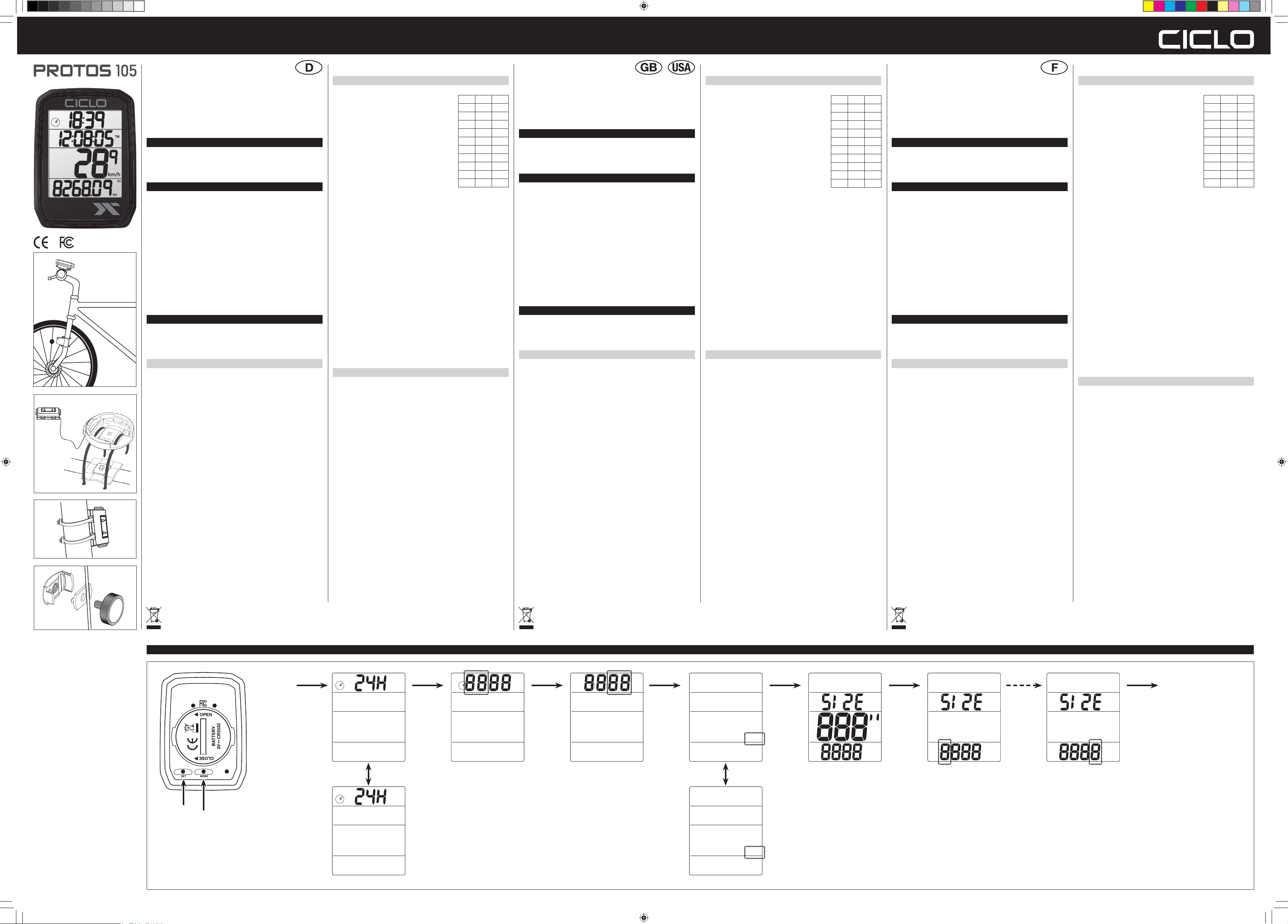
Bitte montieren Sie den Lenkerhalter am Vorbau oder Lenker mit den
beiliegenden Kabelbindern (Abb. 1). Hierzu ziehen Sie die Kabelbinder
entweder in Fahrtrichtung (Lenkermontage) oder quer zur Fahrtrichtung
(Vorbaumontage) durch die dafür vorgesehenen Aussparungen am
Lenkerhalter. Positionieren Sie den Lenkerhalter an der gewünschten Stelle
(Abb.2) und ziehen Sie die Kabelbinder fest. Die Enden der Kabelbinder
können Sie mit einer Schere abschneiden.
Ziehen Sie nun die Kabelbinder durch die Öffnungen am Sender. Befes-
tigen Sie bitte den beiliegenden Magneten an einer Speiche (Abb. 3) und
positionieren Sie den Sender so an der Gabel, dass der Abstand zwischen
Magnet und Sender maximal 3 mm beträgt (Abb. 4). Jetzt können Sie die
Kabelbinder am Sender festziehen und die Enden mit einer Schere kürzen.
Inbetriebnahme
Einlegen der Batterie: Batterie Typ CR2032 mit dem Pluspol nach oben
einlegen. Batteriedeckel auflegen und mit Hilfe einer Münze schließen.
Tastenfunktionen
Ihr PROTOS hat keine Tasten im herkömmlichen Sinn, die Einstellungen
werden mit den zwei „Tasten“ auf der Unterseite gemacht. Diese Tasten
können z.B. mit einem Kugelschreiber gedrückt werden. Nun können Sie
mit der SET-Taste wählen ob Sie die Anzeige der Uhrzeit im 12 oder 24
Stunden Format haben wollen. Ein Druck auf die MODE-Taste speichert
dies jetzt und schaltet zur Einstellung der Uhrzeit weiter. Die blinkende
Stundenanzeige können Sie jetzt mit der SET-Taste verstellen. Ist der
gewünschte Wert erreicht, wird durch Drücken der MODE-Taste der Wert
gespeichert und die Minutenanzeige blinkt. Mit der SET-Taste stellen Sie
den Wert jetzt wieder ein. Zur Speicherung danach bitte 1-mal die MODE-
Taste drücken. Nach diesem Schema können jetzt nach und nach alle
Einstellungen vorgenommen werden.
Für den Reset der Tageswerte müssen Sie die MODE-Taste für etwa
5 Sekunden gedrückt halten (Reset erscheint im Display). Bitte halten Sie
die Taste so lange gedrückt, bis das Display zur normalen Anzeige zurück-
kehrt. Wird die MODE-Taste für 10 Sekunden gedrückt, werden alle Werte,
auch die Jahreswerte, auf „0“ zurückgesetzt (Total Reset blinkt im Display).
Zur Ausführung der Funktion müssen Sie auch hier warten, bis das Display
zur normalen Anzeige zurückschaltet. Durch Drücken der Set-Taste für
5 Sekunden kommen Sie in die Einstellungen.
Einstellungen
Die Reihenfolge der Einstellungen ist wie folgt:
• Uhrzeitformat 24/12 Stunden
• Uhrzeit Stunden und Minuten
• Km/h oder mi/h
• Radumfang in Zoll (s. Tabelle)
Voreinstellungen von 16“– 29“ und 700
• Radumfang einzeln in mm korrigierbar
• Voreinstellung der Gesamtkilometer bis
999999 km ohne Kommastelle
Bitte bewahren Sie den Kaufbeleg für dieses Gerät für die Dauer der
Garantie auf, da dieser bei einer eventuellen Reklamation beigefügt
werden muss. Sie (der Endverbraucher) erhalten 24 Monate Garantie mit
Beginn des Verkaufsdatums. Der Artikel wurde unter Anwendung moderns-
ter Herstellungsverfahren gefertigt und strengen Qualitätskontrollen unter-
zogen. Sollten während der Garantiezeit Mängel auftreten, wenden Sie sich
Die Garantie gilt nicht für Schäden, die durch unsachgemäße Behandlung,
oder durch äußere Einwirkung (Wasser, Sturz, Sonne, Schlag oder Bruch)
verursacht wurden.
Konformitätserklärung:
Hiermit erklärt die CicloSport K.W. Hochschorner GmbH, dass sich das
Gerät PROTOS 105 in Übereinstimmung mit den grundlegenden Anforde-
rungen und den übrigen einschlägigen Bestimmungen der aktuellen
Gesetzeslage befindet.
Die Konformitätserklärung kann unter folgender Adresse gefunden werden:
www.ciclosport.com
Technische Daten
Batterie: CR2032
Frequenz: 125KHz
Die Betriebstemperaturen reichen von -10 ° C bis + 50 ° C.
Die Lagertemperaturen während des Transports liegen zwischen -20 ° C
und + 70 ° C.
Im Zuge der Weiterentwicklung behalten wir uns technische Änderungen
vor.
Kundenservice/Kontakt:
Sollte Ihr Gerät einen Defekt aufweisen/Sie ein Problem damit haben,
schicken Sie uns das Gerät bitte unter Berücksichtigung der folgenden
Punkte an die untenstehende Adresse
1. Senden Sie uns Ihr Gerät immer im Originalkarton
2. Fügen Sie ein Anschreiben mit einer Fehlerbeschreibung,
3. Ihre vollständige Adresse
4. und eine Kopie des Kaufbeleges bei.
5. Frankieren Sie die Sendung mit ausreichend Porto an
CicloSport K.W. Hochschorner GmbH,
Lohenstrasse 11, 82166 Gräfelfing, Germany
MODE D’EMPLOIINSTRUCTION MANUAL
Whmminch
18''141155,6
20''159062,6
22''177069,7
24''190775,7
26''105582,1
27''219686,4
275''218085,8
28''220086,6
29''230090,5
700209682,5
Disposal of Old Electrical & Electronic Equipment (Applicable in the European Union and other European countries with separate collection systems).
This symbol on the product or on its packaging indicates that this product shall not be treated as household waste. Instead it shall be handed over to the applicable collection point for the recycling of
electrical and electronic equipment. By ensuring this product is disposed of correctly, you will help prevent potential negative consequences for the environment and human health, which could otherwise
be caused by inappropriate waste handling of this product. The recycling of materials will help to conserve natural resources. For more detailed information about recycling of this product, please contact
your local city office, your household waste disposal service or the shop where you purchased the product.
Traitement des appareils électriques et electroniques en fin de vie (Applicable dans les pays de l'Union Européenne et aux autres pays européens disposant de systèmes de collecte sélecti-
ve).Ce symbole, apposé sur le produit ou sur son emballage, indique que ce produit ne doit pas être traite avec le déchets ménagers. Il doit être remis à un point de collecte appropié pour le recyclage
des équipments électriques et électroniques. En s’assurant que ce produit est bien mis au rebus de manière appropriée, vous aidrez à prévenir les conséquences négatives potentielles pour
l’environnement et le santé humaine. Le recyclage des matériaux aidera à conserver les ressources naturelles. Pour toute information supplémentaire au sujet du recyclage de ce produit, vouz pouvez
contacter votre municipalité, votre déchetterie ou le magasin où vous avez achaté le produit.
www.ciclosport.com
Congratulations!
With the PROTOS 105 you have a bike computer of the highest Precision
acquired. It is equipped with state-of-the-art electronics and is waterproof.
Please read these operating instructions carefully.
Your CICLOSPORT Team
Package-content
• PROTOS 105 • Battery type CR 2032 • Handlebar mount
• Transmitter • Spoke magnet • Mounting material
Mounting
Please mount the handlebar mount on the stem or handlebar with the
cable ties (Fig. 1). To do this, pull the cable ties either in direction of travel
(handlebar mounting) or transverse to the direction of travel (stem
mounting) through the recesses provided for this purpose on the handlebar
mount. Position the handlebar holder at the desired location (Fig. 2) and
tighten the cable ties. The ends of the cable ties can be cut off with
scissors.
Now pull the cable ties through the openings on the transmitter. Please
mount the magnet on a spoke (Fig. 3) and position the transmitter on the
fork so that the distance between magnet and transmitter with a
maximum of 3 mm (Fig. 4). Now you can tighten the cable ties on the
transmitter and cut of the ends with scissors.
Starting
Inserting the battery: Insert battery type CR2032 with plus-pole facing
up. Close battery cap with a coin, being sure not to over tighten.
Key Functions
Your PROTOS has no buttons in a conventional sense, the settings are
done with the two "buttons" on the bottom of the housing. These buttons
can be pressed with a e.g. ballpoint pen. Now you can use the SET button
to choose whether you want the time to be displayed in 12 or 24 hour
format. Pressing the MODE button now saves this and advances to set the
time. You can now adjust the flashing hour display with the SET button.
When the desired value is reached, the value is saved by pressing the
MODE button and the minute display flashes. Now use the SET key to set
the value again. To save, please press the MODE button once. According
to this scheme, all settings can now be made gradually.
To reset the daily values, you must press the MODE button for about
5 seconds (Reset appears in the display). Please hold the key until the
display returns to the normal display. If the MODE button is pressed for
10 seconds, all values, also, the yearly values, reset to "0" (Total Reset
flashes in display). To execute the function, you must also wait here until
the display switches back to the normal display. Press the SET button for
5 seconds to enter the settings.
Settings
The sequence of settings is as follows:
• Time format 24/12 hours
• Time Hours and minutes
• Km/h or mi/h
• Wheel circumference in inches (see table)
Presets from 16"- 29" and 700
• Wheel circumference individually
correctable in mm
• Presetting of the total kilometres to
999999 km without decimal point
Please keep the proof of purchase for this device for the duration of
guarantee, as this is enclosed in the event of a possible complaint has to
be. You (the end user) receive 24 months warranty with start of the date of
sale. The article was sold under application manufactured using the most
modern production processes and strict quality controls.
Should defects occur during the warranty period, please contact us.
Libble takes abuse of its services very seriously. We're committed to dealing with such abuse according to the laws in your country of residence. When you submit a report, we'll investigate it and take the appropriate action. We'll get back to you only if we require additional details or have more information to share.
Product:
Forumrules
To achieve meaningful questions, we apply the following rules:
First, read the manual;
Check if your question has been asked previously;
Try to ask your question as clearly as possible;
Did you already try to solve the problem? Please mention this;
Is your problem solved by a visitor then let him/her know in this forum;
To give a response to a question or answer, do not use this form but click on the button 'reply to this question';
Your question will be posted here and emailed to our subscribers. Therefore, avoid filling in personal details.
Register
Register getting emails for Ciclo PROTOS 105 at:
new questions and answers
new manuals
You will receive an email to register for one or both of the options.
Get your user manual by e-mail
Enter your email address to receive the manual of Ciclo PROTOS 105 in the language / languages: English, German, Dutch, French, Italian, Spanish as an attachment in your email.
The manual is 2,07 mb in size.
You will receive the manual in your email within minutes. If you have not received an email, then probably have entered the wrong email address or your mailbox is too full. In addition, it may be that your ISP may have a maximum size for emails to receive.
The manual is sent by email. Check your email
If you have not received an email with the manual within fifteen minutes, it may be that you have a entered a wrong email address or that your ISP has set a maximum size to receive email that is smaller than the size of the manual.
The email address you have provided is not correct.
Please check the email address and correct it.
Your question is posted on this page
Would you like to receive an email when new answers and questions are posted? Please enter your email address.